|
xplorer²
Exponential growth to file management productivity
|
Installation and registration
xplorer² is designed for Microsoft Windows operating system (albeit some run it on Linux and Mac using emulators like Wine and Parallels). Once upon a time it run on everything including windows 98, but nowadays the minimum platform is windows 2000 — but it is tested only for windows XP and later, including the latest windows 11 version.
You can download the free trial from the website and evaluate it for free and full power for a period up to a month, then you must either buy or uninstall it as it will stop working. At any point you can uninstall xplorer² using Add or remove programs applet from your system settings (or control panel)

|
Designed for: Windows XP and later
Languages supported:
English, French, German, Japanese, Spanish, Chinese, more
Free trial period: 21 days
|
xplorer² comes in 3 editions, a free lite version that has basic functionality, and the paid professional and ultimate editions. Commands missing from the free lite version are clearly marked with [P] in the menus, and will pop an advertisement for professional version if selected 
|
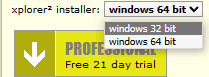
Normally the download page detects your operating system version (usually 64 bit windows nowadays) and lets you have the correct installer for your OS. Sometimes when your important shell extensions are 32 bit, you may want to download the 32 bit xplorer² installer that integrates with 32 bit DLLs, using the version selector next to the download buttons (see pic to the right).
Click on the download button for the edition you are after (pro or ultimate) and once it is finished you can run the installer. It is digitally signed and virus free so there shouldn't be any problems running it.
|
|
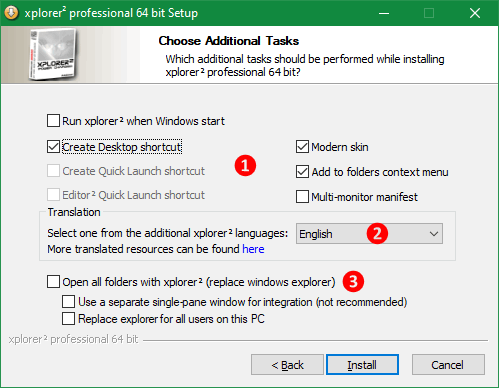
The installer is standard, you get to pick the installation location etc. When you reach Additional tasks page (see picture), you can choose how to install xplorer². There are some general option checkboxes [1], a selector for GUI translation [2] if English isn't your cup of tea, and an option to replace windows explorer [3]. Most options are self-evident, here are brief descriptions:
- Create desktop shortcut. Puts xplorer² shortcut icon on your desktop so you can start the program easily. You can also pin it on your taskbar or use Start menu to type the program name
- Modern skin. Includes nice and big toolbar buttons, recommended to leave it enabled
- Add to folders context menu. Whether to add a "Open with xplorer²" command in shell context menu for folders, lets you start xplorer² with a particular folder easily.
- Multi-monitor manifest. Tick this if you are using many monitors with different DPI resolution, it will make xplorer² automatically adjust its window when you move it across monitors, changing fonts etc so it remains scaled and readable. If this doesn't work well for you, run the installer again and leave this box unticked — and try to sort things out with compatibility tweaks
- Translation.
 Pick one of the available languages using the drop-down list. Note that translations are only for the user interface; all help and support are offered in English. You can switch between a custom translation and english using Help > English translation menu command.
Translations are maintained by volunteers; if you find any problems with the quality please contact support.
- Replace windows explorer. Tick to use xplorer² to open folders by default instead of windows explorer. Note this option does less than most people expect it to do. Windows explorer still exists and runs your desktop. When you double click on folder icons on your desktop, xplorer² appears, that's all. You may as well run xplorer² and open all your folders within the program. Some programs that launch folders do not respect this association and open windows explorer directly. System open/save dialogs cannot be replaced; to help navigate these dialogs copy folder paths from xplorer². To run windows explorer, right click on a folder and tick Open from the context menu (not Open with xplorer²)
- Replace explorer for all users. Tick to replace windows explorer for all users — or just for you. It may upset your spouse if she shares the same PC!
|
|
When you tick the option to replace windows explorer, xplorer² automatically starts whenever you log in. It also takes over <WIN+E> key to open itself. When you close xplorer² window, the program stays in memory (you will see it in program manager in a low resource state); to fully quit xplorer² use File > Exit menu command. If you have problems with folder windows opening out of the blue, disable the explorer replacement mode by uninstalling then reinstalling xplorer² without ticking this option [3]
Program updates
xplorer² is under constant development, and updates are released a couple of times each year with added features and bugfixes. Every 3 years or so there is a big paid for update where the major version number changes e.g. from 4.x to 5.x. Minor updates are free.
|
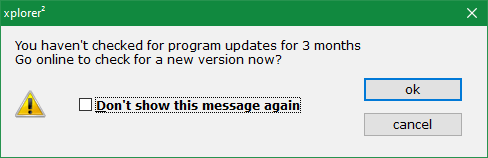
Every few months or so xplorer² will prompt you to check if there's a newer version available. If your license allows it, download and install the latest and greatest version. To cancel these reminders tick Don't show this message again dialog box. From then onwards you can manually use Help > Check for updates menu command to check for newer versions.
When you install an update, it's best to install it over the old version, so that your settings and license key will be preserved. If you want to do a clean install on the other hand, uninstall first and answer YES to both questions (remove settings and license file).
Use Help > What's new? menu command to read what features were added in the latest version.
|
|
For a pro-active update experience use
"Forced updates" advanced option. This defines the period in days when xplorer² will check whether an update is available (it accesses the internet); if there's something new to download you get a notification. Setting this option to 0 disables the feature.
 Ultimate (portable) edition
Ultimate edition is the best xplorer² money can buy. It is more expensive but you get the best algorithms for search, advanced features like the programmable column and portability. See this comparison table:
Table 8. Comparison of xplorer² editions
| | Professional | Ultimate
|
| Explore and preview |  |
|
| Folder tabs and dual panes | |
|
| Advanced search & file management | |
|
| Fast desktop search | — |
|
| Portable use (without installation) | — |
|
| Unique extra features | — |
|
|
If you are using xplorer² on the move you will find that saving program settings in the windows registry is not an option. One of the main advantages of xplorer² ultimate version is its portability. Using options ("Save program state" drop-down list) you can tell xplorer² to store its settings in an INI file instead of the registry.
If you keep your ultimate version on a USB stick then pick the settings persistence option "file in installation folder", which will save the settings in a file called X2SETTINGS.INI next to the xplorer² executable program. If you installed the ultimate version on your hard disk and still don't want to use the registry, pick the option "file in user appdata folder" (usually C:\Users\<you>\AppData\Roaming\zabkat), as the installation folder inside C:\Program Files will most likely be protected and inaccessible.
INI files are slower so if you have xplorer² installed on your home base, you'd better save settings in the registry.
If your company regulations won't allow you to install programs, you can create a portable xplorer² installation on a USB stick (flash drive) and run it from there without installation — assuming you are allowed you to run stuff off USB sticks at work.
Here are the step-by-step instructions to place xplorer² ultimate in a USB stick environment. For example assuming we want to setup the portable version within F:\x2portable\ folder:
- Install xplorer² ultimate on your home computer (on your C:\ hard disk) and use your unlock key to activate it.
- Setup the program options to taste.
- Use the menu command Actions > Export settings to write the settings to the file F:\x2portable\x2settings.INI — click on legacy settings task button
- Copy all the files in the installation folder (typically C:\program files\zabkat\xplorer2) including the license file X2.LIC to the USB stick (F:\x2portable)
- (optional) If you are using the mini-scrap pane make sure you place the CIDA contents file on your USB stick too, by right-clicking on the miniscrap and choosing Save as command - but note that all contents must be on the USB stick.
Steps 3-4 above can be done automatically with a "hidden" menu command number 33553. Use the command finder to search for this special command 33553 and double click on it to execute. It will ask for a USB drive path and then create a X2PORTABLE subfolder that includes the program, license and your settings in an INI file.
If you have problems setting this up please watch this demo video:
Not all your favorite settings may be reusable in different computers; e.g. some of your bookmarks may point to inexistent folders. Using environmental variables in path definitions may alleviate this problem. If you want to have portable
user commands, install your tools in subfolders of your xplorer² portable location (under
F:\x2portable\) and use
%X2DIR% environmental variable to address them instead of fixed paths — it points to xplorer² installation folder. For example edit the user command description to
%X2DIR%tools\myTool.exe which will be equivalent to
F:\x2portable\tools\myTool.exe but won't depend on the drive letter your USB stick happens to be assigned with.
After you properly set up your portable edition in a removable medium like a USB stick, then you have these advantages:
- No installation is required to be used in any computer. Even if you don't have administrative privileges you can enjoy your xplorer² wherever your work happens to bring you.
- No traces left in the host computer. After you quit xplorer² the foreign registry will be unmodified.
To ease the way you access xplorer² from your removable media you can create an AUTORUN.INF file in your root USB drive folder, and set it to open xplorer² (whenever you plug in the USB stick), editing it as such:
[autorun]
open=x2portable\xplorer2_64.exe [optional arguments]
Further reading
◪ Add other
portable tools on your thumbdrive and use them from your portable xplorer²
Program registration
xplorer² is a "try before you buy" application. You can download and install it, then use it for free at full capacity for a limited time period. This way you can tell if it is the right tool for you before buying it. The longer you take to evaluate the more nags it will throw at you, including this nag dialog when you start it:
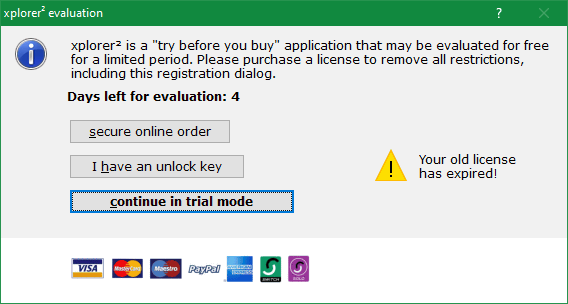
Figure 56. Registration prompt nag dialog
Click on Continue in trial mode to proceed without a key. Eventually after a period of evaluation at full capacity, it will ask for an unlock key to let you run it. At this point you should make up your mind, whether to purchase or uninstall. Use Secure online order to buy a license — all major credit cards and paypal are accepted for payment.
xplorer² is licensed per user. If you are the only user and have 2 computers, you only need one license key. But you must add a seat for each extra user. Your purchase will entitle you to free upgrades and support for one year (at minimum, perhaps longer). The version you buy is yours to keep and will work forever. Costs will only be incurred for updates, if you want them.
How to use your unlock key
After you complete the order process, the registration key will be sent to you via email.
Once you receive your key by email, click on I have an unlock key and start the external license manager in full administrator mode. If you see any UAC elevation prompt click Yes to run xplorer² elevated.
Open the email with the unlock key, and copy/paste the long funny looking key (all of it, usually 3-4 lines of text) and paste it in the license manager window, then click on Activate license button. If all goes well, you can restart xplorer² and enjoy the program in full power. If you use Help > About menu command you will see your name and email as the proud owner of a fully licensed xplorer²
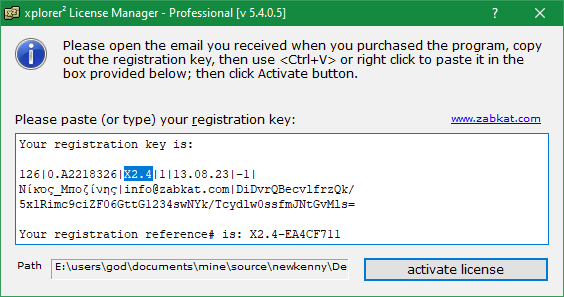
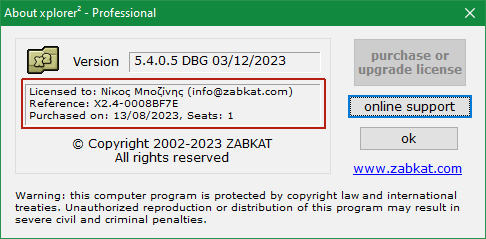
Figure 57. Paste unlock key in license dialog
The professional and ultimate editions have
different unlock keys. If you bought a license for xplorer² professional it can only be used if you install the professional version (and vice versa for the ultimate edition). You can check which xplorer² version you are running using
Help > About menu command — or check the window title bar of the license manager.
If you don't have the correct version installed just get the relevant trial version from the website. You can quickly tell which license you bought from the format of the registration
reference number (see the email receipt). Ultimate version keys are
longer.
- professional: X2.4-12345678
- ultimate: X2UL.4-E2282F64
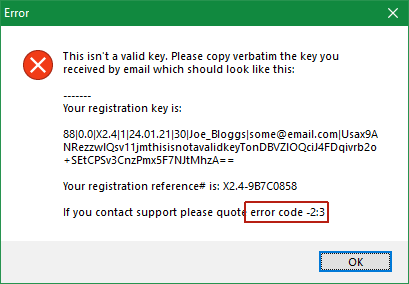
If there's something wrong with your key, xplorer² will tell you about it with an error message, which will include a brief explanation of the problem and a numeric error code (see the pic to the right). Here are the most frequent error codes and their remedies:
- Key typo (failed checksum -2:3). Did you copy out the entire key? It should be 3-4 text lines and look like the one in figure 57 above. Some people leave out the trailing = (equal) signs. Spaces & formatting doesn't matter but you shouldn't modify the key in any way.
- Key for other program (-3:2). If you own other zabkat programs, you will find that all unlock keys look similar, so you may end up using your i-DeClone key to unlock xplorer²! Please make sure the key includes the token |X2.xxx| (or |X2UL.xxx| for ultimate) which indicates a key for xplorer². This error may also indicate you are using a professional key to unlock ultimate edition (or vice versa).
- Wrong version (expired key -5:5). Most likely you are using an older version key to unlock the latest version 6.x. You must either pay for an upgrade or download the older version you bought.
If you still have problems please watch the demo video about using the key, and failing even that you can always contact the support team, quoting the exact error code.
|
|
Suspected bugs
xplorer² is thoroughly tested and used by many people all around the world, so persistent bugs are few and far between. However being a low-level tool, and given the diversity of operating systems it runs, the multiplicity of user configurations, and buggy shell extensions people install, crashes and hangs are a sad fact of life, like taxes.
When xplorer² crashes for one reason or other, it usually restarts itself automatically. If you see a lot of crashes in similar circumstances, please notify program support using Help > Crash information menu command. This tries to retrieve extended information on the latest crash and attaches it to an email meant for xplorer² customer support.
Crash information is a windows minidump file named x2minidump_xxx x64.mdmp, where xxx is your installed version number. Some email clients people use won't allow direct attachments; in that case xplorer² adds the line "Please manually locate and drag-drop the attachment here using the path: ". Please locate the MDMP file in %TEMP% folder and attach it to your email report.
Another type of problem is xplorer² getting stuck, not responding. This occurs naturally sometimes, when xplorer² is busy in a heavy computation you've asked for, but if it doesn't come back (after waiting a reasonable amount of time) it could be stuck for good. You can try pressing <ESC> key a few times; failing that, start another xplorer² instance using its desktop shortcut, and immediately use Help > Crash information menu: this should detect that there's a stuck instance and generate an email with information about the problem. Please send it forward to xplorer² support.
This trick cannot help if xplorer² is hanging when it
starts. Many times startup troubles are down to unavailable network drives you were browsing last time, so you can try starting xplorer² at fixed safe locations without tabs, using
command line arguments like:
xplorer2_64.exe /1 /T c:\
If safe starting folders won't solve the hang, you can try the procdump tool. A more drastic solution would be to uninstall, erase all your settings, then reinstall. However this will lose all your bookmarks etc
If you think you've discovered a bug, please ask yourself a few questions before seeking support:
- Will rebooting your PC solve the problem? It is a well known and sad fact that windows isn't the most robust operating system in the world. Many times starting afresh will make the problem go away.
- Try downloading the latest xplorer² version your license will allow. Bugs are fixed all the time, so please keep your version current.
- Is this a known issue? Try searching the documentation (including the plain text files, xplorer² Mark > Containing text command will be helpful) for a relevant keyword. Your bug may be a "feature" after all!
- Can you reproduce the bug? If you can't, neither would the development team so they couldn't help you. Some crashes are just freak 1-off ignorable events.
- Think of the context when the problem occurs. Is it only for some specific files or folders? What is their common characteristic? Please include as much information as you can when reporting a bug.
Thank you and sorry for any inconvenience caused!
Troubleshooting common problems
Table 9. Problems and solutions
| Problem | Solution
| | I can't use my unlock key
| Please copy/paste the entire key from the registration email. For more information see this step by step guide
| | My unlock key stopped working
| Old keys bought for previous xplorer² versions will not work for the latest version. You must either get a replacement key (either free or paid upgrade) — or continue using the older version you bought originally.
| | xplorer² is slow to start
| Did you leave xplorer² browsing network locations that are no longer connected? Try using /N command line switch or start on safe fixed locations.
| | General browsing is very slow
| If browsing folders is painfully slow, you may be using too many of the advanced features. Prime suspect is sorting folder items by a slow property or color coding on slow rules. The more you ask from xplorer² the slower things will become! More info...
| | Safely eject USB drive
| Don't just yank USB cables, always right click on the external drive icons (e.g. on the drivebar) and pick Eject or Safely remove from the context menu, and wait for the notification that it is "safe to remove hardware". xplorer² should unlock any resources if you e.g. are browsing a folder on the device. For external hard drives also use the eject button
 on windows taskbar.
| | Can't delete locked files
| If you get a File in Use error when deleting files, see if you have the file open in its application. You must first close the file then delete it. If you are previewing the file in xplorer², usually there shouldn't be a problem because xplorer² turns off the preview before deleting. However some native preview handlers are buggy and may lock files. In that case turn off the previewer with <CTRL+Q> then restart xplorer² to delete the file.
| | Can't copy files in system folders
| If you try copying files into protected folders like c:\Program files you will get an Access Denied error. The workaround is to copy files with drag-drop instead of robust copy. See here for more information on UAC
| | Audio or video preview doesn't work
| xplorer² uses an embedded version of Windows Media Player (WMP) for playback. If your videos show without picture or sound, or xplorer² crashes on media preview, try downloading a recent media codec pack like K-Lite
| | I cannot see thumbnails
| xplorer² shares the fast windows thumbnail cache for quick image previews. Sometimes the cache gets full or corrupted and must be rebuilt. For this and other recovery options click here. An extreme solution is "Don't use windows thumbnail cache" advanced option but then extraction will be slow.
|
|
Further reading
◪ All frequently asked questions (
FAQ)
© 2002-2026 ZabKat LTD, All Rights Reserved
zabkat.com