©2002-2026 ZABKAT
 xplorer²
exponential growth in file management productivity




Home » Tour » Browse » Preview » Search » Manage » Synchronize » Console » Customize
■ Preview your documents' content quickly
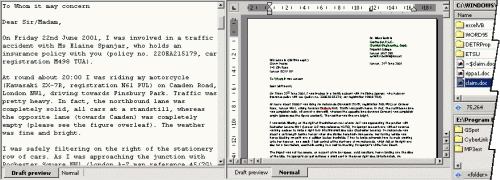
xplorer² has a quick preview panel that recognises most popular text, graphics, media (audio/video) and document formats (office and PDF) as well as source code.
The previewer has a draft mode (tab) that is especially quick extracting text content, and a native mode that can activate in-place document servers like Microsoft Word using ActiveX technology and the newer vista/7/8/10 document preview handlers.
xplorer² can collaborate with all your text filters meant for windows indexing service, extracting text from proprietary formats like PDFs, DOCs, WPDs, ODTs etc. Such filters also enable accurate text searching within files.
Press both mouse buttons on a file to see a large preview of it on the spot, and get rid of it easily with a mouse or key press. This peek preview mode gives you large previews without permanently sacrificing screen real estate.
■ Metadata (file tags and properties)
In detailed view mode you have a large number of available columns that help you get a better view of your content. xplorer² integrates both shell column handlers available in windows explorer (e.g. ID3 tags, even in windows 7!) plus it offers many useful columns of its own e.g. for file checksums. You can arrange files using more than one column at a time (multi-way sort), which is a must for large file collections.
Whatever you see in xplorer² can be extracted as text for printing or other book-keeping and report generation.
Next: DESKTOP SEARCH »
Sample demo videos
 Click on a link to get a glimpse of xplorer² capabilities
- demo: preview PDF documents in draft and full mode
- demo: Instant preview (mouse peek) in a popup window
- demo: tag (comment) pictures to remember what they are about
- demo: how to print folder contents (listings)

